Showing posts with label PHP. Show all posts

Thursday, March 1, 2018

[php][Resolved] mkdir() [function.mkdir]: No such file or directory in /

Error message:

<br>
<b>Warning</b>:  mkdir() [<a href="function.mkdir">function.mkdir</a>]: No such file or directory in <b>image_upload.php</b> on line <b>63</b><br>
<br>
<b>Warning</b>:  move_uploaded_file(../../../images/upload/news/content/newFile/20180226110439__18021803SHIBUYA109outletmainvisual-1519971588.jpg) [<a href="function.move-uploaded-file">function.move-uploaded-file</a>]: failed to open stream: No such file or directory in <b>image_upload.php</b> on line <b>77</b><br>
<br>
<b>Warning</b>:  move_uploaded_file() [<a href="function.move-uploaded-file">function.move-uploaded-file</a>]: Unable to move '/tmp/phpQDxI9P' to '../../../images/upload/news/content/newFile/20180226110439__18021803SHIBUYA109outletmainvisual-1519971588.jpg' in <b>image_upload.php</b> on line <b>77</b>

Source

$file_original_dir = '../../../images/upload/news/content/newFile/';
$fileType          = strtolower(substr(basename($_FILES['uploadfile_content']['name']), strrpos(basename($_FILES['uploadfile_content']['name']), '.') + 1));        
if(!file_exists($file_original_dir )) mkdir($file_original_dir , 0777);

Correction

Add 3rd argument, boolean true to mkdir() function.
$file_original_dir = '../../../images/upload/news/content/newFile/';
$fileType          = strtolower(substr(basename($_FILES['uploadfile_content']['name']), strrpos(basename($_FILES['uploadfile_content']['name']), '.') + 1));        
if(!file_exists($file_original_dir )) mkdir($file_original_dir , 0777, true);

Reference

https://stackoverflow.com/questions/22896920/warning-mkdir-function-mkdir-no-such-file-or-directory-php

Wednesday, August 23, 2017

[php 7.1][Resolved] PHP Warning: Zend OPcache huge_code_pages: madvise(HUGEPAGE) failed: Invalid argument (22) in Unknown on line 0

 Erorr message

PHP Warning: Zend OPcache huge_code_pages: madvise(HUGEPAGE) failed: Invalid argument (22) in Unknown on line 0
Open your 10-opcache.ini and change the value of opcache.huge_code_pages from 1 to 0:
for my case, it located in
/etc/php.d/10-opcache.ini
 i use vim to edit:
sudo vim /etc/php.d/10-opcache.ini

Press "esc" and type :wq! to save the file.

and then restart your server using this command
sudo systemctl restart httpd.service
or this  :
service httpd restart

Reference

https://talk.plesk.com/threads/please-share-your-opinion-about-plesk-php-packages.335242/page-3
https://stackoverflow.com/questions/27640772/disabling-opcache-enable-in-php-ini-not-working-on-centos?noredirect=1

Wednesday, July 26, 2017

[php][Resolved] Composer\Exception\NSslException

Step 1)

Remove the ; before the line "extension=php+openssl.dll " :


So that it looks :
;extension=php_oci8_12c.dll  ; Use with Oracle Database 12c Instant Client
extension=php_openssl.dll
;extension=php_pdo_firebird.dll
extension=php_pdo_mysql.dll
;extension=php_pdo_oci.dll
;extension=php_pdo_odbc.dll

Step 2)

If you are in development machine only (not recommended for your Server), turn off TLS for composer by this command :
composer config -g -- disable-tls true

Step 3)

restart your web server.

Reference

https://stackoverflow.com/questions/35249620/the-openssl-extension-is-required-for-ssl-tls-protection

[php][windows] force using specific php version to run command

method 1 

Type this in command prompt:
set PATH=%PATH%;YOUR_PHP_DIRECTORY
for example:
set PATH=%PATH%;C:\xampp\php

method 2 

Using this command to specify the executable file to run the command prompt:
C:\xampp\php\php.exe -n -v
text in yellow is the php .exe you wanted to use for execute, and text in green is the command you want to execute. It's to check php version in this case/


Reference

https://stackoverflow.com/questions/15517718/php-version-on-windows-command-line
https://stackoverflow.com/questions/7767447/how-can-i-force-php-version-for-command-line

Wednesday, March 8, 2017

[php][centos][Resolved] No package php7.1-gd available.

Background

I tried to use this command to install gd module for php version 7.1 but fail, here is the command and message:

Command
sudo yum install php7.1-gd
Result

Solution
Use command to search the available repository in mirror first:
yum search php-gd
and you would found a list of available repository

According the image, i think the module php71-php-gd.x86_64 maybe fit me cos i am using php7.1, so i try a new command to install it:

sudo yum install php71-php-gd.x86_64

and it works !
type "y" and enter to install that :


 Done :

don't forget restart your server:
sudo systemctl restart httpd.service
service httpd restart
 

Monday, January 23, 2017

[Resolved] cURL error 6: Could not resolve host: api.mailgun.net (see http://curl.haxx.se/libcurl/c/libcurl-errors.html)

Error message

cURL error 6: Could not resolve host: api.mailgun.net (see http://curl.haxx.se/libcurl/c/libcurl-errors.html)

Solution

The solution maybe strange, go restart your server, it may be solved, at least this works for me.

Reference

https://laracasts.com/discuss/channels/servers/laravel-guzzle-curl-error-6-could-not-resolve-host-http-see-httpcurlhaxxselibcurlclibcurl-errorshtml

Tuesday, November 1, 2016

[Android][php] Example code for using okhttp to send post repuest and get response from a php webpage

Step1 - Add okhttp as dependencies in yout project

Firstly, you needed to add dependencies your build.gradle in your module and check "Sync Now" next to the line "Gradle files have changed since last project sync. A project sync may be neccessary for the IDE to work properly." with yellow background.


dependencies {
    compile fileTree(dir: 'libs', include: ['*.jar'])
    testCompile 'junit:junit:4.12'
    compile 'com.android.support:appcompat-v7:23.4.0'
    compile 'com.squareup.okhttp3:okhttp:3.2.0'
}

Step 2 - Create php file

Create a php file named "test.php", for my case i placed it at C:\xampp\htdocs\fcm in windows platform.
<?php
echo "Hello World : ";
if(isset($_POST['test'])) echo $_POST['test'];
?>

Step 3 - Make request and get feedback in your android project

Make request in AsyncTask or Thread, to make it looks simple i put that in a Thread (but using Thread in android may not is the good practice).
import android.os.Bundle;
import android.support.v7.app.AppCompatActivity;
import android.util.Log;

import java.io.IOException;

import okhttp3.FormBody;
import okhttp3.OkHttpClient;
import okhttp3.Request;
import okhttp3.RequestBody;
import okhttp3.Response;

public class MainActivity extends AppCompatActivity {

    @Override
    protected void onCreate(Bundle savedInstanceState) {
        super.onCreate(savedInstanceState);
        setContentView(R.layout.activity_main);

        Thread t = new Thread(new Runnable(){
            @Override
            public void run() {
                OkHttpClient client = new OkHttpClient();
                RequestBody body = new FormBody.Builder()
                        .add("test","HAHA")
                        .build(); //Create request body

                Request request = new Request.Builder()
                        .url("http://192.168.232.45/fcm/test.php")
                        .post(body)
                        .build(); //create request

                try {
                    //Send request and save response
                    Response response = client.newCall(request).execute();
                    //Show response
                    Log.d("dump","dump:"+response.body().string());
                } catch (IOException e) {
                    e.printStackTrace();
                }
            }
        });
        t.start();
    }
}

Reference

https://square.github.io/okhttp/3.x/okhttp/okhttp3/ResponseBody.html

Sunday, October 9, 2016

[OAuth2][Laravel][Resolved] your requirements could not be resolved to an installable set of packages

Problem

My story is i am following a tutorial and tried to install OAuth2 package with composer for laravel5.0 but fail, this is the part i added in composer.json located in project root.
    "require": {
        "laravel/framework": "5.0.*",
        "lucadegasperi/oauth2-server-laravel": "5.0.*"
    },

the related command on Windows platform :
composer update
And the error message :
your requirements could not be resolved to an installable set of packages: Conclusion: don't install laravel/frameworkv5.0.xx

Solution

Firstly you have to visit official OAuth2 package website to check are you required to install a correct OAuth2 package version via composer
Official site of github lucadegasperi/oauth2-server-laravel :
https://github.com/lucadegasperi/oauth2-server-laravel

For my case i should install "lucadegasperi/oauth2-server-laravel": "4.0.*" but not "lucadegasperi/oauth2-server-laravel": "5.0.*" for my laravel 5.0.x.

So i have to correct the oauth2 version and run "composer update" command again.

    "require": {
        "laravel/framework": "5.0.*",
        "lucadegasperi/oauth2-server-laravel": "4.0.*"
    },


Friday, September 30, 2016

[php][Resolved] ERR_CONTENT_DECODING_FAILED

To solve the problem, these things i did :

1) Turn on zlib.output_compression in your php.ini, default is Off, edit it to On.


2) If you using notepad++ for coding, save the file cause problem without BOM.


3) If after finishing (1)  and (2) still is not work, check your php syntax. For me case it's strange that i use return syntax to replace echo , the problems solved.
from
public function uploadImage(){
    //To do sth
    $response['resultCode'] = "s";
    echo json_encode($response);
}
to
public function uploadImage(){
    //To do sth
    $response['resultCode'] = "s";
    return json_encode($response);
}

Reference

https://stackoverflow.com/questions/14039804/error-330-neterr-content-decoding-failed

Wednesday, August 10, 2016

[php][Resolved] Illegal offset type

When you get this  "Illegal offset type" error may means you used an array or object as the index of an array, or key of object. For an example, this case used an array as object key cause the error:
    public function getUserData()
    {
        $temp = ['id','user_name', 'email'];
        $user  = [];
        foreach($temp as $index){
            $user->$temp = $this->attributes[$temp];
        }
        return $user;
    }   

Corrected :
    public function getUserData()
    {
        $temp = ['id','user_name', 'email'];
        $user  = [];
        foreach($temp as $index){
            $user->$index = $this->attributes[$index];
        }
        return $user;
    }   

Reference:
http://stackoverflow.com/questions/2732451/php-how-do-i-fix-this-illegal-offset-type-error

Wednesday, February 17, 2016

[Codeigniter 2][Resolved] Unable to access an error message corresponding to your field name

This is the example code return the validation error  message as "Unable to access an error message corresponding to your field name":
function _article_valid() {
    $this->load->helper(array('form', 'url'));
    $this->load->library('form_validation');
    $this->form_validation->set_rules('title', 'Title', 'required');
    $this->form_validation->set_rules('url', 'Url', 'callback_url_check');
    return $this->form_validation->run();
}    

function url_check($url){
    if ($url == 'test') {
        $this->form_validation->set_message('url', 'The field can not be the word "test"');
        return FALSE;
    }else{
        return TRUE;
    }  
}
And i found the problem is caused by the text in red with yellow background shown above.

Firstly, according example code shown at official site, that value same as the callback function name, and also same as function name after "callback_" rule prefix :


and then I change the first argument of set_message which's same as the callback function name and found its work.

function url_check($url){
    if ($url == 'test') {
        $this->form_validation->set_message('url_check', 'The field can not be the word "test"');
        return FALSE;
    }else{
        return TRUE;
    }  
}

of cos it's work for this too:
function _article_valid() {
    $this->load->helper(array('form', 'url'));
    $this->load->library('form_validation');
    $this->form_validation->set_rules('title', 'Title', 'required');
    $this->form_validation->set_rules('pwd', 'pwd', 'callback_pwd_valid');
    return $this->form_validation->run();
}    

function pwd_valid($pwd){
    if ($pwd == 'test') {
        $this->form_validation->set_message('pwd_valid', 'The field can not be the word "test"');
        return FALSE;
    }else{
        return TRUE;
    }  
}
And according the article by brianantonelli in brianistech.wordpress.com, you can also change the first argument of set_message function to __FUNCTION__ , also is a solution. (tested works in this articcase)
function url_check($url){
    if ($url == 'test') {
        $this->form_validation->set_message(__FUNCTION__, 'The field can not be the word "test"');
        return FALSE;
    }else{
        return TRUE;
    }  
} 

Reference:

http://www.codeigniter.com/userguide2/libraries/form_validation.html#callbacks 
https://brianistech.wordpress.com/2010/11/22/unable-to-access-an-error-message-corresponding-to-your-field-name/

Saturday, January 9, 2016

[php][Resolved] PHP Fatal error: Call to undefined function mb_internal_encoding()

Check error log and found this:


Step 1
Firstly, you need to check are you installed php extension mbstring() since it's the non-default extension. This means it is not enabled by default. For detail pls visit php official site:
http://php.net/manual/en/mbstring.installation.php

Whether have you installed mbstring() extension (package php-mbstring) or not, you can run the command :
sudo yum install php-mbstring
If you haven't installed that, yum would ask you download the php-mbstring package or not, then you press "y" to download, otherwise it would tell you that you have already installed and "Nothing to do".

Restart your http service. (if you are not using centOS , the command maybe different.)


Create a php file and contains these content to check your php config, run that file on your server:
<?php phpinfo(); ?>
<hr />
<?php get_loaded_extensions(); ?>


And then check is extension "mbstring" loaded. If it's loaded, you may able to see something like that:

Reference:
http://php.net/manual/en/mbstring.installation.php
http://stackoverflow.com/questions/478844/how-do-i-see-the-extensions-loaded-by-php
http://blog.csdn.net/Duffy_Ma/article/details/45767315

Saturday, July 18, 2015

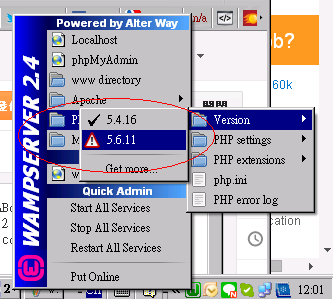
[php] This PHP versioon doesn't seem to be compatible with your actual Apache Version.

This is an error when upgrade the PHP version in WAMP.


Found a solution is open your "wampmanager.conf" file at your php version directory. for example:

C:\wamp\bin\php\php5.6.11\wampmanager.conf
 Open it and add a


Reference:
http://stackoverflow.com/questions/18704910/wamp-server-errors-switching-apache-php-versions-on-fresh-install

Wednesday, May 27, 2015

[Codeigniter][Resolved] Remove index.php from url

To remove the “index.php” away from url, following the official documents only is not always works. After some searching in google found following a tutorial from Formget.com can do a good jobs and let share here:

Edit Config.php file:
 look for the "application/config/config.php" file, change the value of $config['index_page'] from "index.php" to "".
 From
$config['index_page'] = "index.php"; 
To
$config['index_page'] = "";


And Then change the value of $config['uri_protocol'] from "AUTO" to "REQUEST_URI":


.htaccess
Create an empty files named ".htaccess" at your Codeigniter project root, and paste these code inside the file:
RewriteEngine On
RewriteCond %{REQUEST_FILENAME} !-f
RewriteCond %{REQUEST_FILENAME} !-d
RewriteRule ^(.*)$ index.php/$1 [L] 


Reference:
https://ellislab.com/codeigniter/user-guide/general/urls.html
http://www.formget.com/codeigniter-htaccess-remove-index-php/

Thursday, April 2, 2015

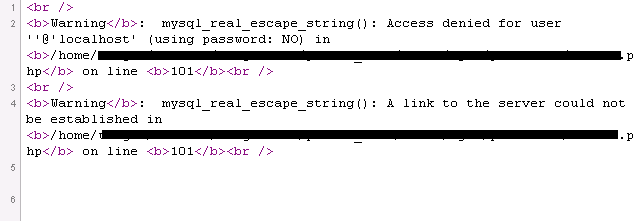
[MySQL][PHP][Resolved] mysql_real_escape_string(): A link to the server could not be established in xxx


Firstly, check which version of PHP you are using at your server.

Since the php function “mysql_real_escape_string” is only works for PHP 4 >= 4.3.0, and PHP5. If your PHP version is not among the version mentioned and newer then that, you should to use the MySQLi or PDO_MySQL extension instead since the extension was deprecated as of PHP 5.5.0.

There is an example , change your “mysql_real_escape_string” :
$content = mysql_real_escape_string($html_content);

To Procedural style
$conn = mysqli_connect(“localhost”,”root”,” password”,”test”);
//<-- This line is for showing where is the value $conn from
$content = mysqli_real_escape_string($conn, $html_content);
Or Object oriented style
$conn = mysqli_connect(“localhost”,”root”,” password”,”test”);
//<-- This line is for showing where is the value $conn from
$content = $conn->real_escape_string ($html_content);
Reference:
http://php.net/mysql_real_escape_string
http://php.net/manual/en/mysqli.real-escape-string.php

Wednesday, April 1, 2015

[php][Resolved] Creating default object from empty value

You should check are you called an objected you haven’t defined.
Let go to an example

1 $staff_items = array(“a”,”b”);
2 $address = Staff::find(1); //$address is an object storing staff data
3 foreach($staff_items as $o_row){
4     $staff->$o_row = $_POST($o_row); //This line causes error
5 }


In the case provided above, line 5 would cause error because object $staff haven’t defined. The $staff object should be defined before use it:

1 $staff_items = array(“a”,”b”);
2 $staff = Staff::find(1); //$staff is an object storing staff data
3 foreach($staff_items as $o_row){
4     $staff->$o_row = $_POST($o_row);
5 }

If you can't sure if your object is defined and do not want "Creating default object from empty value" appear, you can use "isset" condition to check if it exists
if (!isset($object)){}
Related example :
1 $staff_items = array(“a”,”b”);
2 $staff = Staff::find(1); 
3 foreach($staff_items as $o_row){
4     if(isset($staff)){
5         $staff->$o_row = $_POST($o_row);
6     }
7 }
Reference:
http://stackoverflow.com/questions/14806959/how-to-fix-creating-default-object-from-empty-value-warning-in-php 
http://stackoverflow.com/questions/8900701/creating-default-object-from-empty-value-in-php

Tuesday, February 10, 2015

[php][Resolved] Turn on OpenSSL with wamp in window platform


To enable openSSL, firstly, find out your php.ini to edit. for example, if your wamp install at
C:\wamp\
visit the directary with your php version version which looks like this:
C:\wamp\bin\php\php5.4.16

And open the php.ini:
 

Remove the ";" in front of this line:

;extension=php_openssl.dll

----Part 2----
Start your wamp:

left click the WAMP server icon at right-bottom,  (if you haven't start wamp, run it first)

Click PHP-> PHP extensions


and then click php_openssl if there is no click at that item:


Restart WAMP

Reference:
http://stackoverflow.com/questions/26841430/laravel-exception-after-page-is-refresh-openssl-extension-is-required

Wednesday, February 4, 2015

[php] php Constant already defined

IF you found the your constant was already defined in php, the Error message:
Constant MINS already defined

you should add some code to check if your constant was defined not.

From this:
define('constant', 'value');
To this:
if (!defined('constant')) define('constant', 'value');
An Example:
<?php
define('MIN', '5');
echo '<hr /><h2>Have not check constant.</h2>';
echo MIN;
define('MIN', '5');
echo '<hr /><h2>Checked constant.</h2>';
if (!defined('MIN')) define('MIN', '5');
echo MIN;
?>
Result:


Reference:
http://stackoverflow.com/questions/5887108/constant-already-defined-in-php

Wednesday, January 21, 2015

[PHP][Resolved] PHP error: Use of undefined constant

At usual, careless mistake would cause this error, for example, missed the dollar sign in front of your php value. Syntax highlighted in yellow is the right syntax which need to be aware in the example provided below:

Case 1:
if(title == ""){} //Wrong
if($title == ""){} //Right

Case 2:
$department = mysql_real_escape_string($_POST[department]); //Wrong
$department = mysql_real_escape_string($_POST['department']); //Right
Case 3:

$field_name = ‘department’;
$department = mysql_real_escape_string($_POST[$field_name]); //Right

Reference:
http://php.net/manual/en/language.constants.php
http://stackoverflow.com/questions/2941169/what-does-the-php-error-message-notice-use-of-undefined-constant-mean

[PHP][Tutorial] Usage of constant variable in php.

Constant variable is a variable whose value cannot be changed once it has been assigned a value. A constant in php is an identifier (name) for a simple value,
start with a letter or underscore (not start with a dollar sign), followed by any number of letters, numbers, or underscores.

Syntax to Define constant variable outside a class: (change the orange text to you text:)
define('CONSTANT_NAME', ' constant value');
Define constant variable within a class:(change the orange text to you text:)
const CONSTANT_NAME = constant value;

There is a good example by wbcarts at juno dot com, can explain how to use the constant variable clearly:
<?php
define('MIN_VALUE', '0.0');   // RIGHT - Works OUTSIDE of a class definition.
define('MAX_VALUE', '1.0');   // RIGHT - Works OUTSIDE of a class definition.


//const MIN_VALUE = 0.0;         WRONG - Works INSIDE of a class definition.
//const MAX_VALUE = 1.0;         WRONG - Works INSIDE of a class definition.


class Constants{
  //define('MIN_VALUE', '0.0');  WRONG - Works OUTSIDE of a class definition.
  //define('MAX_VALUE', '1.0');  WRONG - Works OUTSIDE of a class definition.


  const MIN_VALUE = 0.0;      // RIGHT - Works INSIDE of a class definition.
  const MAX_VALUE = 1.0;      // RIGHT - Works INSIDE of a class definition.


  public static function getMinValue()
  {
    return self::MIN_VALUE;
  }

  public static function getMaxValue()
  {
    return self::MAX_VALUE;
  }
}

echo “Value of ”.MIN_VALUE.”<br />”;
echo “Value of ”. MAX_VALUE.”<br />”;
?>

Result :
Value of 0.0
Value of 1.0

Reference:
http://php.net/manual/en/language.constants.php
http://www.businessdictionary.com/definition/constant-variable.html#ixzz3PRtfxwqi