Showing posts with label Python. Show all posts

Friday, March 15, 2019

[tutorial][python] Determinant matrix

It’s for help us to found out inverse of a matrix. syntax like this


And matrix to use determinant MUST BE square (i.e. have the same number of rows as columns).

You better if have a look of this link:
https://www.mathsisfun.com/algebra/matrix-determinant.html

Example 1

Using determinant to calculate this matrix :


We use this rule to multiply elements in matrix where Blue is positive (+ad) and Red is negative (−bc) :


With python, we can use det() method to get the result.
import numpy as np
from scipy import linalg as la

A = np.array([[3,8],[4,6]])
print(la.det(A))
Result :
-14.0

Example 2

det(A) = | A | = (1*4)-(2*3) = 4 - 6  = - 2.0

Calculation with python :
import numpy as np
from scipy import linalg as la

A = np.array([[1,2],[3,4]])
print(A)
B = la.det(A)
print(B)
Result :
[[1 2]
 [3 4]]
-2.0

Example 3

Let use python with package numpy and linalg to represent the determinant of this 3×3 matrix:


import numpy as np
from scipy import linalg as la

A = np.array([[6,1,1],[4,-2,5],[2,8,7]])
print(A)
B = la.det(A)
print(B)
Result: 
[[ 6  1  1]
 [ 4 -2  5]
 [ 2  8  7]]
-306.0


[tutorial][python] Matrix of ones

All elements in matrix are number 1, that’s so called Matrix of ones.

Reference:
https://en.wikipedia.org/wiki/Matrix_of_ones

Calculation with python:
A = np.array([[13,9,7],[8,7,4],[6,4,0]])
B = np.array([[1,1,1],[1,1,1],[1,1,1]])
print(A.dot(B))
Result :
[[29 29 29]
 [19 19 19]
 [10 10 10]]
It’s special that elements in 1st line in output matrix are all values 13+9+7 = 29, it’s the amount of the 1st line in  input elements.

All elements in 2nd lines of output matrix valued 19, which’s the amount of the 2nd line in  input elements (8+7+4).

All elements in 3rd lines of output matrix valued 10, which’s the amount of the 2rd line in  input elements (6+4+0).

[tutorial][python] Zero Matrix

By using zero matrix, all result would turn to 0

Calculation with python:
import numpy as np
from scipy import linalg

A = np.array([[13,9,7],[8,7,4],[6,4,0]])
B = np.array([[0,0,0],[0,0,0],[0,0,0]])
print(A.dot(B))
Result:
[[0 0 0]
 [0 0 0]
 [0 0 0]]


Using numpy to create zero matrix:
import numpy as np

a = np.zeros((10,3))
print(a)
print("--------------")
b = a.T
print(b)
print("--------------")
c = np.reshape(b,(5,6))
print(c)
Result :
[[ 0.  0.  0.]
 [ 0.  0.  0.]
 [ 0.  0.  0.]
 [ 0.  0.  0.]
 [ 0.  0.  0.]
 [ 0.  0.  0.]
 [ 0.  0.  0.]
 [ 0.  0.  0.]
 [ 0.  0.  0.]
 [ 0.  0.  0.]]
--------------
[[ 0.  0.  0.  0.  0.  0.  0.  0.  0.  0.]
 [ 0.  0.  0.  0.  0.  0.  0.  0.  0.  0.]
 [ 0.  0.  0.  0.  0.  0.  0.  0.  0.  0.]]
--------------
[[ 0.  0.  0.  0.  0.  0.]
 [ 0.  0.  0.  0.  0.  0.]
 [ 0.  0.  0.  0.  0.  0.]
 [ 0.  0.  0.  0.  0.  0.]
 [ 0.  0.  0.  0.  0.  0.]]

[tutoral][python] Identity Matrix

The identity matrix [I] for multiplication is a square matrix with a 1 for every element of the principal diagonal (top left to bottom right) and 0 in other position:


It is a special matrix, because when we multiply by it, the original is unchanged:

Let prove A*I = A in Python:
import numpy as np
from scipy import linalg

A = np.array([[13,9,7],[8,7,4],[6,4,0]])
B = np.array([[1,0,0],[0,1,0],[0,0,1]])
print(A.dot(B))
Result:
[[13  9  7]
 [ 8  7  4]
 [ 6  4  0]]
And then I*A = A ?

import numpy as np
from scipy import linalg

A = np.array([[1,0,0],[0,1,0],[0,0,1]])
B = np.array([[13,9,7],[8,7,4],[6,4,0]])
print(A.dot(B))
Result:
[[13  9  7]
 [ 8  7  4]
 [ 6  4  0]]

Orz, the result really same.

Reference :
https://www.mathsisfun.com/algebra/matrix-multiplying.html

[Tutorial][Python] Multiplying a Matrix by Another Matrix

Suppose there are 2 matrix for multiplication: This is the most basic method to do matrix calculation. In example shown below, 2 is so called scalar in this calculation. We multiply each number in matrix by this scalar 2, and mark multiplied result in same location in matrix.
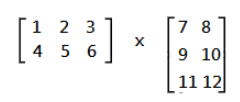
*The number of columns in A need to equal to the number of rows in B.
To calculate that we need to do an action named “dot product”
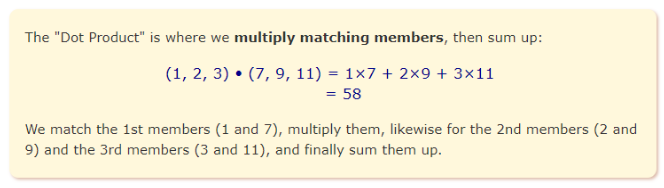


 With python, we can use .dot() to calculate the dot product for these 2 matrix:



Example for Multiplying a Matrix by Another Matrix

Question 1) 


4*1+5*0 = 4+0 = 4
Result is 4

Python :
import numpy as np
from scipy import linalg

A = np.array([4,5])
B = np.array([[1],[0]])
print(A.dot(B))
Result:
[4]

Question 2


From a to f in order, there are the calculation order with use dot product :

a: (1,-2) • (4,-1)  = (1*4)+(-2*-1)  = 4+2 = 6
b: (0,3) • (4,-1)  = (0*4)+(3*-1)   = 0-3 = -3
c: (-1,4) • (4,-1) = (-1*4)+(4*-1)  = -4-4 = -8
d: (1,3) • (1,2)   = (1*4)+(-2*-1)  = 1-4 = -3
e: (0,3) • (1,2)   = (0*4)+(3*-1)   = 0+6 = 6
f: (-1,4) • (1,2)  = (-1*4)+(4*-1)  = -1+8 = 7

Calculation with Python:
import numpy as np
from scipy import linalg

A = np.array([[1,-2],[0,3],[-1,4]])
B = np.array([[4,1],[-1,2]])
print(A.dot(B))
Result :
[4]
Reference:
http://chortle.ccsu.edu/vectorlessons/vmch15/vmch15_4.html


Question 3
This is a question from Math is fun website:
https://www.mathsisfun.com/algebra/matrix-multiplying.html


From information, i create 2 matrix:
And the result would be in this format: [a,b,c,d]

a.        (3,4,2) • (13,8,6)   = (3*13)+(4*8)+(2*6)  = 39+32+12 = 83
b.        (3,4,2) • (9,7,4)     = (3*9)+(4*7)+(2*4)    = 27+28+8   = 63
c.        (3,4,2) • (7,4,0)     = (3*7)+(4*4)+(2*0)    = 21+16+0   = 22
d.        (3,4,2) • (15,6,3)   = (3*15)+(4*6)+(2*3)  = 45+24+6   = 75

Result is [$83,$63,$22,$75], which’s means
A.        Sold are monday are $83.
B.        Sold are Tuesday are $63.
C.        Sold are Wedenday are $22.
D.        Sold are Thurday are $75.

Calculation with Python:
import numpy as np
from scipy import linalg

A = np.array([3,4,2])
B = np.array([[13,9,7,15],[8,7,4,6],[6,4,0,3]])
print(A.dot(B))
Result
[83 63 37 75]

Reference:
http://chortle.ccsu.edu/vectorlessons/vmch15/vmch15_4.html
https://www.mathsisfun.com/algebra/matrix-multiplying.html

[Tutorial][python] Scalar multiplication

This is the most basic method to do matrix calculation. In example shown below, 2 is so called scalar in this calculation. We multiply each number in matrix by this scalar 2, and mark multiplied result in same location in matrix.


With python, we can use .dot() to calculate the dot product for this matrix with scalar 2:

import numpy as np
from scipy import linalg
A = np.array([[4,0],[1,-9]])
print(A.dot(2))
Result :
[[ 8 0]
[ 2 -18]]

Tuesday, March 12, 2019

[tutorial][python] Using numpy module create matrix

1) import numpy as np is for creating numpy object.
2) np.arange(25) is for creating a list from 0 to 24, total is 25 elements.
3) a.reshape((5,5)) means from the list (data source) provided, create a 5*5 array.

Python example:
import numpy as np #1
a = np.arange(25) #2
b = np.arange(25)
print("------- Source -------")
print(a)
print(b)
print("------- Reshape ------")
a = a.reshape((5,5)) #3
b = b.reshape((5,5))
print(a)
print(b)
print("--- After calculation ---")
print(a+b)
print(a-b)
print(a*b)
print(a/b)
print(a**2)
print(a<b)
print(a>b)
print(a.dot(b))

Result:
------- Source -------
[ 0  1  2  3  4  5  6  7  8  9 10 11 12 13 14 15 16 17 18 19 20 21 22 23 24]
[ 0  1  2  3  4  5  6  7  8  9 10 11 12 13 14 15 16 17 18 19 20 21 22 23 24]
------- Reshape ------
[[ 0  1  2  3  4]
 [ 5  6  7  8  9]
 [10 11 12 13 14]
 [15 16 17 18 19]
 [20 21 22 23 24]]
[[ 0  1  2  3  4]
 [ 5  6  7  8  9]
 [10 11 12 13 14]
 [15 16 17 18 19]
 [20 21 22 23 24]]
--- After calculation ---
[[ 0  2  4  6  8]
 [10 12 14 16 18]
 [20 22 24 26 28]
 [30 32 34 36 38]
 [40 42 44 46 48]]
[[0 0 0 0 0]
 [0 0 0 0 0]
 [0 0 0 0 0]
 [0 0 0 0 0]
 [0 0 0 0 0]]
[[  0   1   4   9  16]
 [ 25  36  49  64  81]
 [100 121 144 169 196]
 [225 256 289 324 361]
 [400 441 484 529 576]]
[[ nan   1.   1.   1.   1.]
 [  1.   1.   1.   1.   1.]
 [  1.   1.   1.   1.   1.]
 [  1.   1.   1.   1.   1.]
 [  1.   1.   1.   1.   1.]]
[[  0   1   4   9  16]
 [ 25  36  49  64  81]
 [100 121 144 169 196]
 [225 256 289 324 361]
 [400 441 484 529 576]]
[[False False False False False]
 [False False False False False]
 [False False False False False]
 [False False False False False]
 [False False False False False]]
[[False False False False False]
 [False False False False False]
 [False False False False False]
 [False False False False False]
 [False False False False False]]
[[ 150  160  170  180  190]
 [ 400  435  470  505  540]
 [ 650  710  770  830  890]
 [ 900  985 1070 1155 1240]
 [1150 1260 1370 1480 1590]]

Friday, March 1, 2019

[python][tutorial] Eigenvalues and Eigenvectors

Example 1
Let use python calculate what’s the determinant of first:  
import numpy as np
from scipy import linalg as la
A = np.array([[1,2],[3,2]])
print(A)
B = la.det(A)
print(B)
Result:
[[1 2]
 [3 2]]
-4.0
 That’s means:

In this case, 4 is the eigenvalues λ


import numpy as np
from scipy import linalg as la

A = np.array([[1,5,2],[2,4,1],[3,6,2]])
lna,v = la.eig(A)
l1,l2,l3 =lna
#Eigenvalue
print(l1,l2,l3)
print("----------------")
#Eigenvector
print(v)
print("----------------")
print(v[:,0])
print(v[:,1])
print(v[:,2])
v1 = np.array(v[:,0]).T
print("----------------")
print(v1)
print(la.norm(A.dot(v1)-l1*v1))
Result:
(7.95791620491+0j) (-1.25766470568+0j) (0.299748500767+0j)
----------------
[[-0.5297175  -0.90730751  0.28380519]
 [-0.44941741  0.28662547 -0.39012063]
 [-0.71932146  0.30763439  0.87593408]]
----------------
[-0.5297175  -0.44941741 -0.71932146]
[-0.90730751  0.28662547  0.30763439]
[ 0.28380519 -0.39012063  0.87593408]
----------------
[-0.5297175  -0.44941741 -0.71932146]
3.233018248352212e-15
V[:,0] means 1st line of matrix

Friday, February 15, 2019

[tutorial][python] Inverse matrix


Inverse matrix is available in n×n matrix only. But n×n matrix may not means have inverse matrix.

If matrix A and matrix B are inverse matrix each others, it can be represented as

Suppose there are 2 matrix:
 
Let have a look how to get the result, work for a dot product on AB first:
A.      (2,3) • (-7,5) = (2*-7)+(3*5)  = -14+15 = 1
B.      (2,3) • (3,-2) = (2*3)+(3*-2) = 6-6       = 0
C.      (5,7) • (-7,5) = (5*7)+(7*5)  = -35+35 = 0
D.      (5,7) • (3,-2) = (5*3)+(7*-2) = 15-14   = 1

BA use same method to get.


Both of the them are resulted 1 , B is in inverse matrix of A and A is in inverse matrix of B. We can represent their relation in this math format :

 * Pay attention to the -1 sign.

Example 1 

The coming example use as source stored in A, and than use linalg.inv() inverse matrix of source and print it out:
import numpy as np
from scipy import linalg

A = np.array([[2,3],[5,7]])
print(A)
print(linalg.inv(A))
Result :
[[2 3]
 [5 7]]
[[-7.  3.]
 [ 5. -2.]]


Example 2

This example is to calculate dot product

(2,3) • (5,7) = 2*5 + 3*7 = 10+21 =31

import numpy as np
from scipy import linalg

A = np.array([2,3])
B = np.array([5,7])

print(A.dot(B))
Result :
31

Example 3

Example in python :

import numpy as np
from scipy import linalg

A = np.array([[1,3,4],[2,5,1],[2,3,8]])
print(A)
print(linalg.inv(A))
print(A.dot(linalg.inv(A)))
Result:
[[1 3 4]
 [2 5 1]
 [2 3 8]]
[[ -1.76190476e+00   5.71428571e-01   8.09523810e-01]
 [  6.66666667e-01   5.55111512e-17  -3.33333333e-01]
 [  1.90476190e-01  -1.42857143e-01   4.76190476e-02]]
[[  1.00000000e+00   2.22044605e-16   0.00000000e+00]
 [ -2.22044605e-16   1.00000000e+00  -2.77555756e-16]
 [  0.00000000e+00   2.22044605e-16   1.00000000e+00]]

Saturday, February 2, 2019

[python][resolved] Cannot uninstall 'six'. It is a distutils installed project and thus we cannot accurately determine which files belong to it which would lead to only a partial uninstall

Error message:
Found existing installation: six 1.4.1

Cannot uninstall 'six'. It is a distutils installed project and thus we cannot accurately determine which files belong to it which would lead to only a partial uninstall

What is the python version you are using ? Is your computer installed both version 2 and version 3?
if you use sth like the command below and got this error, try use pip3 :
pip instal python_name
such as :
pip3 instal python_name
Reference
https://www.jianshu.com/p/45fb07007ddc

Friday, February 1, 2019

[python][resolved] expected string or bytes-like object

Error message:
TypeError: expected string or bytes-like object
Example with error code:
num_list = re.findall(r"[-+]?\d*\.\d+|\d+", txt)
return int(num_list[0])
You can convert the argument as str if you want use int function:
num_list = re.findall(r"[-+]?\d*\.\d+|\d+", txt)
return int(str(num_list[0]))
Reference:
https://stackoverflow.com/questions/43727583/re-sub-erroring-with-expected-string-or-bytes-like-object

Monday, December 11, 2017

[Python3][Resolved] start_engine() takes 0 positional arguments but 1 was given

Error message

---------------------------------------------------------------------------
TypeError                                 Traceback (most recent call last)
<ipython-input-12-8f585077ddb5> in <module>()
     23 newCar = Car()
     24 print(newCar.color)
---> 25 print(newCar.start_engine())
     26 print(newCar.drive())
     27 print(newCar.stop_engine())

TypeError: start_engine() takes 0 positional arguments but 1 was given

Source code

class Car:
    color = "Blue"

    def start_engine():
        print("Starting the engine!")
    def drive():
        print("Driving the car!")
    def stop_engine():
        print("Turning off the car!")

newCar = Car()
print(newCar.color)
print(newCar.start_engine())
print(newCar.drive())
print(newCar.stop_engine())

Solution

Since the method in class is a class method but not a function, we need a 'self' parameter :
class Car:
    color = "Blue"

    def start_engine(self):
        print("Starting the engine!")
    def drive(self):
        print("Driving the car!")
    def stop_engine(self):
        print("Turning off the car!")

newCar = Car()
print(newCar.color)
print(newCar.start_engine())
print(newCar.drive())
print(newCar.stop_engine())

Reference

https://www.tutorialspoint.com/python/python_classes_objects.htm
https://stackoverflow.com/questions/18884782/typeerror-worker-takes-0-positional-arguments-but-1-was-given

Sunday, November 12, 2017

[Python3][Resolved] NameError: name 'say' is not defined

 Error message

C:\python\ipython\Tutorials\ Eduonix\exercises>C:\Users\xxxx\AppData\Local\P
rograms\Python\Python36-32\python man.py
Traceback (most recent call last):
  File "man.py", line 31, in <module>
    male = Male()
  File "man.py", line 5, in __init__
    say(self.type)
NameError: name 'say' is not defined

Source Code

class Human():
    def __init__(self):
        self.type = "human"
        say(self.type)
    def sleep(self):
        pass
    def eat(self,food):
        print("I eat "+food)
    def excrete(self):
        pass
    def say(self, type):
        print("I am a "+type)
       
class Male(Human):
    sex_chromosomes = "XY"
   
class Man(Male):
    age = "elder"
    def say(self):
        say("male")
    def say(self):
        say("male")

male = Male()

Correction 

The __init__ method is roughly what represents a constructor in Python and the self variable represents the instance of the object itself., If you want call the method within the class, you need to add the keyword self:
class Human():
    def __init__(self):
        self.type = "human"
        self.say(self.type)
    def sleep(self):
        pass
    def eat(self,food):
        print("I eat "+food)
    def excrete(self):
        pass
    def say(self, type):
        print("I am a "+type)
       
class Male(Human):
    sex_chromosomes = "XY"
   
class Man(Male):
    age = "elder"
    def say(self):
        say("male")
    def say(self):
        say("male")

male = Male()

Friday, November 10, 2017

[Flask][Resolve] no module named 'flask_mysql'


 Error message

app.py:2: ExtDeprecationWarning: Importing flask.ext.mysql is deprecated, use fl
ask_mysql instead.
  from flask.ext.mysql import MySQL
C:\Users\xxxxxx\AppData\Local\Programs\Python\Python36-32\lib\site-packages\fl
ask\exthook.py:106: ExtDeprecationWarning: Detected extension named flaskext.mys
ql, please rename it to flask_mysql. The old form is deprecated.
  .format(x=modname), ExtDeprecationWarning
 * Running on http://127.0.0.1:5000/ (Press CTRL+C to quit)
127.0.0.1 - - [11/Jan/2018 14:49:11] "GET / HTTP/1.1" 200 -

 Source code

from flask import Flask, render_template, json, request
from flask.ext.mysql import MySQL

mysql = MySQL()
app = Flask(__name__)
mysql.init_app(app)

@app.route('/')
def main():
    return render_template('index.html')
  
if __name__ == "__main__":
    app.run(port=5002)
Error message shows "flask.ext.mysql is deprecated, use flask_mysql instead.", followed the instruction use flask_mysql still fail :

 Wrong code follow instrument from error message:
from flask import Flask, render_template, json, request
from flask_mysql import MySQL

mysql = MySQL()
app = Flask(__name__)
mysql.init_app(app)

@app.route('/')
def main():
    return render_template('index.html')
 
if __name__ == "__main__":
    app.run(port=5002)
Finally find need to import flaskext.mysql:
from flask import Flask, render_template, request, json
from flaskext.mysql import MySQL

app = Flask(__name__)
mysql = MySQL()
mysql.init_app(app)

@app.route("/")
def main():
    return render_template('index.html')

if __name__ == "__main__":
    app.run()

Reference

http://flask-mysql.readthedocs.io/en/latest/
https://github.com/jay3dec/PythonFlaskMySQLApp---Part-1

[Flask][Resolved] NameError: name 'request' is not defined

Error message

C:\python\flask\tutsplus.com>python app.py
 * Running on http://127.0.0.1:5000/ (Press CTRL+C to quit)
[2018-01-11 12:38:56,004] ERROR in app: Exception on /signUp [POST]
Traceback (most recent call last):
  File "C:\Users\xxxxxx\AppData\Local\Programs\Python\Python36-32\lib\site-pac
kages\flask\app.py", line 1982, in wsgi_app
    response = self.full_dispatch_request()
  File "C:\Users\xxxxxx\AppData\Local\Programs\Python\Python36-32\lib\site-pac
kages\flask\app.py", line 1614, in full_dispatch_request
    rv = self.handle_user_exception(e)
  File "C:\Users\xxxxxx\AppData\Local\Programs\Python\Python36-32\lib\site-pac
kages\flask\app.py", line 1517, in handle_user_exception
    reraise(exc_type, exc_value, tb)
  File "C:\Users\xxxxxx\AppData\Local\Programs\Python\Python36-32\lib\site-pac
kages\flask\_compat.py", line 33, in reraise
    raise value
  File "C:\Users\xxxxxx\AppData\Local\Programs\Python\Python36-32\lib\site-pac
kages\flask\app.py", line 1612, in full_dispatch_request
    rv = self.dispatch_request()
  File "C:\Users\xxxxxx\AppData\Local\Programs\Python\Python36-32\lib\site-pac
kages\flask\app.py", line 1598, in dispatch_request
    return self.view_functions[rule.endpoint](**req.view_args)
  File "app.py", line 14, in signUp
    _name = request.form['inputName'] # read the posted values from the UI
NameError: name 'request' is not defined
127.0.0.1 - - [11/Jan/2018 12:38:56] "POST /signUp HTTP/1.1" 500 -

Example source code

from flask import Flask
app = Flask(__name__) #create an app using Flask as shown

@app.route('/',methods=['POST'])
def main():
    _name = request.form['inputName'] # read the posted values from the UI
    _email = request.form['inputEmail']
    _password = request.form['inputPassword']
    
if __name__ == "__main__": #check if the executed file is the main program
    app.run() #run the app

Solution


Since request is used, so you need to check request is imported:
from flask import Flask, request
app = Flask(__name__) #create an app using Flask as shown

@app.route('/',methods=['POST'])
def main():
    _name = request.form['inputName'] # read the posted values from the UI
    _email = request.form['inputEmail']
    _password = request.form['inputPassword']
    
if __name__ == "__main__": #check if the executed file is the main program
    app.run() #run the app

[Python3][Resolved] TypeError: descriptor '__init__' requires a 'super' object but received a 'str'

Source code

class Contact:
    def __init__(self, first_name, last_name):
        self.first_name = first_name
        self.last_name  = last_name
        self.full_info  = first_name + " " + last_name
    def print_contact(self):
        print(self.full_info)
       
class EmailContact(Contact):
    def __init__(self, first_name, last_name, email):
        super.__init__(first_name, last_name)
        self.email = email
        self.full_info = email

email_contact = EmailContact("test","person","test@person.com")

Problem and correct 


In this case, this problem is related to mistype of calling super class, it should be super().super.__init__(first_name, last_name) but not super.__init__(first_name, last_name) :

class Contact:
    def __init__(self, first_name, last_name):
        self.first_name = first_name # use self to create property
        self.last_name  = last_name
        self.full_info  = first_name + " " + last_name
    def print_contact(self):
        print(self.full_info)
       
class EmailContact(Contact):
    def __init__(self, first_name, last_name, email):
        super().__init__(first_name, last_name)
        self.email = email
        self.full_info = email

Reference

https://answers.yahoo.com/question/index?qid=20130815221209AAFxexr

Monday, October 23, 2017

[Python][Resolved] DataConversionWarning: Data with input dtype int32 was converted to float64 by MinMaxScaler. warnings.warn(msg, DataConversionWarning)

Source with warming

where np_matrix is a NumPy Matrix of 100 rows by 5 columns consisting of random integers from 1-100.
from sklearn.preprocessing import MinMaxScaler
scaler_model = MinMaxScaler()
scaler_model.fit(np_matrix)
scaler_model.transform(np_matrix)

Updated code

from sklearn.preprocessing import MinMaxScaler
scaler_model = MinMaxScaler()
scaler_model.fit(np_matrix.astype(float))
scaler_model.transform(np_matrix)

Reference

https://stackoverflow.com/questions/39214164/data-conversion-error-while-applying-a-function-to-each-row-in-pandas-python

Thursday, October 12, 2017

[Python3][Resolved] TypeError: 'module' object is not callable, module & inheritance

Source code

The files are in a package named person.

male.py
class Male():
    sex_chromosomes = "XY"
    def __init__(self):
        self.type = "male"
    def say(self):
        #super().say()
        print("I am a male")

man.py
from person import male

male = male()
male.say()

Problem

male is a module but not a class, it can't be called as a class to creating class instance, it should be a careless mistake.
man.py
from person import male

male = male.Male()
male.say()
A related error using this example :
[Python3][Resolved] NameError: name 'Male' is not defined, module & inheritance

Reference

https://stackoverflow.com/questions/4534438/typeerror-module-object-is-not-callable

Friday, September 22, 2017

[Python][Resolved] TypeError: unhashable type: 'list'

 I want to convert a 2 dimensional list to a set with set(), but it got a type error:
>>> list1 = [[1,2,3],[2,5,6],[7,8,9]]
>>> type(list1)
<class 'list'>
>>> set1 = set(list1)
Traceback (most recent call last):
  File "<stdin>", line 1, in <module>
TypeError: unhashable type: 'list'
I found it's needed to change syntax to create your list
>>> list2 = [(1,2,3),(2,5,6),(7,8,9)]
>>> type(list2)
<class 'list'>
>>> set2 = set(list2)
>>> set2
{(7, 8, 9), (2, 5, 6), (1, 2, 3)} 


Friday, September 15, 2017

[Python][Resolved] object() takes no parameters error


Error message

  File "C:/python/xxxx/xxx.py", line 12, in <module>
    d=Dog('small dog')

TypeError: object() takes no parameters

Source Code

class Dog:
    name='samll dog'
    def __inti__(self,name):
        self.name=name
       
d=Dog('small dog')
e=Dog('very small dog')

print(type(d))
print(type(e))

print(d.name)
print(e.name)

Problem

Wrong spelling mistake, it should be __init__ but not __inti__ :
class Dog:
    name='samll dog'
    def __init__(self,name):
        self.name=name
       
d=Dog('small dog')
e=Dog('very small dog')

print(type(d))
print(type(e))

print(d.name)
print(e.name)

Reference

https://stackoverflow.com/questions/23176597/python-object-takes-no-parameters-error